Case study
Making a complex catalog easier to shop.
- Project
- Midwest InkjetWork in progress
- Contribution
- Planning the shopping experience, organizing the catalog, designing the pages and building the Shopify theme.
- Tools & languages
- Shopify · Liquid · HTML · CSS · JavaScript
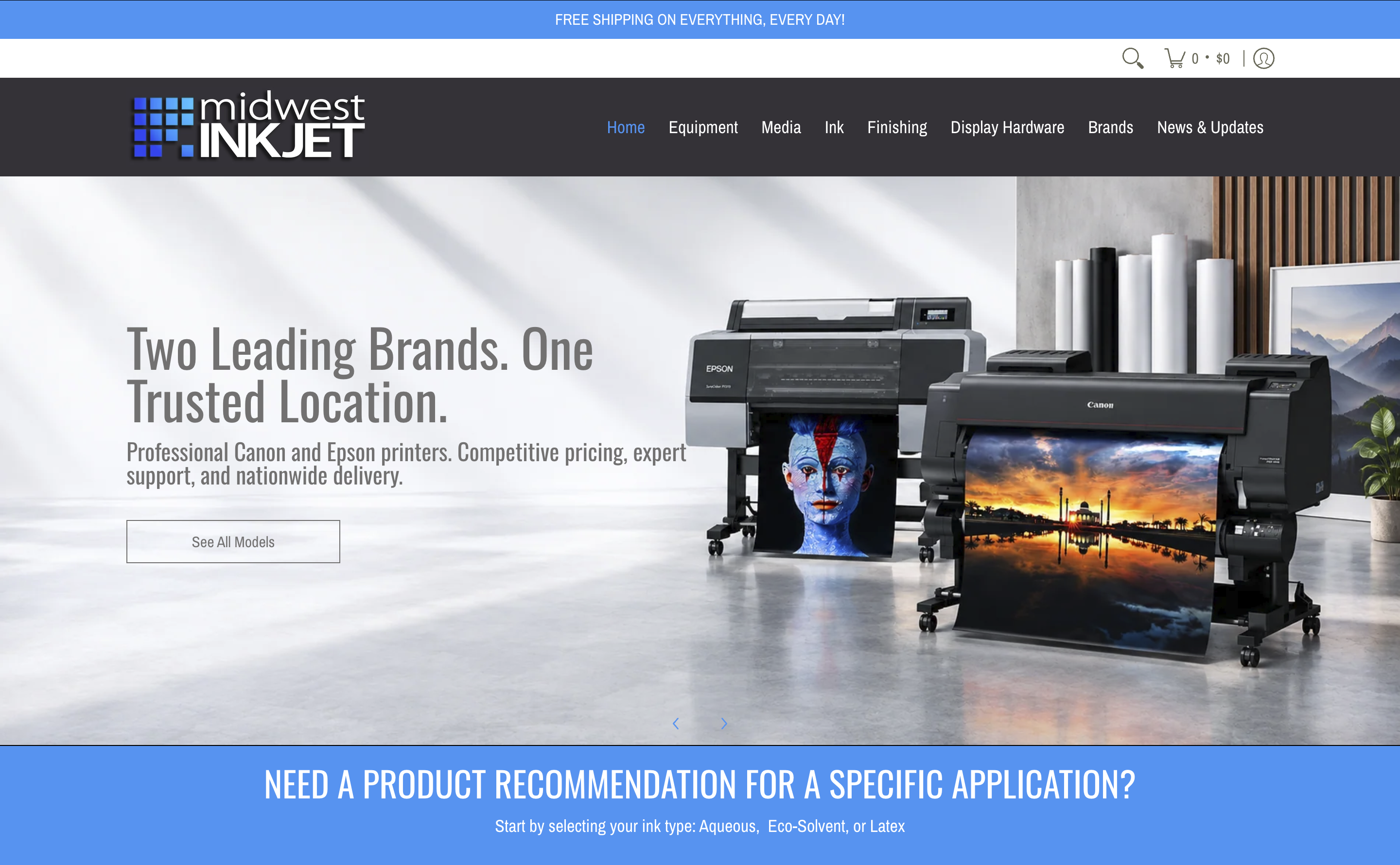
We’re making it easier to find the right media for an existing printer—or choose new equipment for the work a customer wants to do.
Midwest Inkjet sells professional printers, media and related supplies. Its customers need more than a long list of products: they need to understand which options fit their printer and the job they want to print.
Our work brings clearer shopping paths, more useful product details and simpler buying choices to the existing Shopify store.
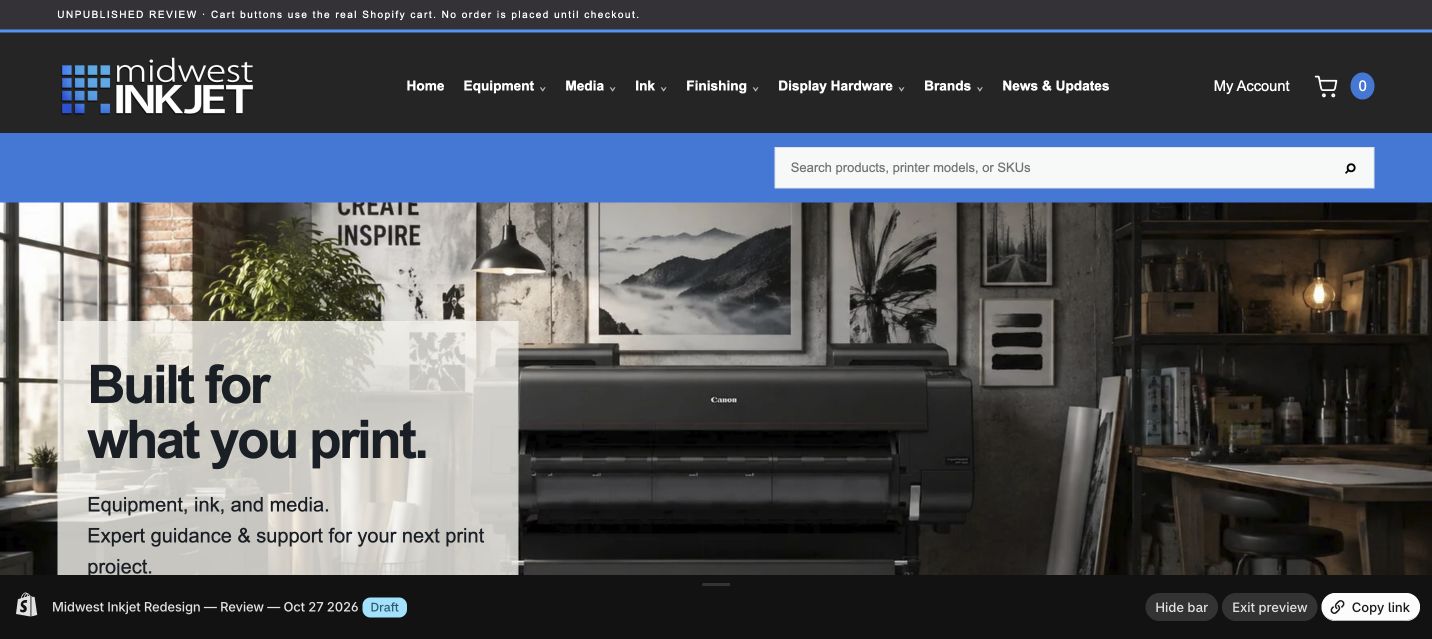 RedesignedPrevious
From concept to implementation
01Help customers find what they need
Start with the customer’s question
Customers usually come to Midwest Inkjet for one of two reasons: they need media for a printer they already own, or they want to buy a new printer.
“Which media will work with my printer?”
We’re creating a way for shoppers to select their printer, then narrow the choices by what they want to make. A paper, fabric or film needs to work with both the printer and the intended job. The website should help customers understand those differences before they buy.
“Which printer should I buy?”
Customers shopping for equipment need a different starting point. We’re organizing equipment choices around the work they want to produce and the printer’s capabilities, so they can find relevant options and ask more useful questions.
How we chose this approach
We reviewed the existing website, product information and manufacturer specifications. That showed us where clearer categories, compatibility information and product details could help customers make a decision. We still need to test these paths with representative shopping tasks before launch.
02Make product details and buying options clearer
Put the important information in the same place
We’re giving media products a shared page layout. Customers can find the description, specifications, price, product code, version, size and quantity in a familiar order, instead of learning a different layout for each product.
Show the difference between versions
Photo Tex is one example. The aqueous product comes in Original, EX and OPA versions. The solvent product comes in Original S, EXS and OPAS versions. Customers choose a version, then see the sizes sold for that version. The specifications, product code and price update to match their choice.
Send the right item to the cart
Shopify stores each purchasable version and size combination as a separate variant. We connect the customer’s choices to that exact variant, so the cart receives the item they selected. We also show roll width and roll length separately to make sizes easier to understand.
Use reliable product information
We use manufacturer pages and technical sheets to check material, thickness, weight, opacity, adhesive and printer compatibility. Missing or conflicting information remains a task to resolve; we don’t invent a specification to fill a blank.
03Build the site and connect customer information
How the site is built
The redesign uses Shopify’s existing products, prices and cart. Liquid, Shopify’s template language, places product information on the page. HTML structures the content, CSS controls the layout on phones and computers, and JavaScript makes the printer finder and product selectors respond to customer choices.
Help customers keep moving
We’re connecting finder results to product pages and improving the next steps when a search finds nothing. Shared templates and settings also make it easier to update the catalog without rebuilding each page.
Connect website activity to HubSpot
Midwest Inkjet already has a Shopify–HubSpot connection. Our audit found gaps in contact syncing and field mapping, so we can’t yet say that all customer information reaches HubSpot. Those gaps need to be resolved and tested.
Use printer information for useful follow-up
We want to connect a customer’s selected printer, product interests and purchases to their record when they identify themselves. That could help Midwest recommend suitable media, send replenishment messages and share relevant equipment offers. An optional printer-selection section before checkout is proposed, but it has not been added yet. The tracking and marketing connections still need configuration and testing.
Explore the design and development work
UX & architecture
Turn the shopping plan into a usable structure
We organized the interface around two starting points: an existing printer or a new equipment purchase. Printer brand, model and configuration, together with application and media categories, provide the information needed to narrow the catalog.
Keep the parts connected
Shared navigation, finder results and product pages form one path. Clear-filter actions and empty-result messages help shoppers recover when their first choices do not produce a useful result. Support links carry printer and product context into the inquiry route.
What still needs checking
The matching rules and navigation need representative shopping-task checks on phones and computers. A useful filter is only as reliable as the compatibility data behind it.
Shopify development
Languages and their jobs
Liquid, Shopify’s template language, renders product data and reusable page sections on the server. HTML gives those pages structure. CSS controls the visual layout and responsive behavior. JavaScript handles interactive controls such as image selection, the finder, version and size choices, and cart feedback.
Build once, reuse across the catalog
Shared Liquid templates and snippets provide the media-page layout instead of maintaining a separate layout for every product. Shared assets and theme-editor settings make later design changes easier to manage.
Where the work runs
The redesign is an unpublished Shopify theme. Shopify continues to provide the product database, customer accounts, checkout and order handling. This is custom theme and interface development, not a replacement commerce back end.
Catalog & product data
Use existing products and variants
The interface reads Shopify product identities, images, prices, product codes and available variants. A variant is the exact version and size combination that can be purchased. Product copy and specification panels need to describe that selection accurately.
Make technical information consistent
Manufacturer pages and technical sheets inform material, thickness, weight, opacity, adhesive and compatibility. Roll width and roll length are separate fields. The Photo Tex specification panel changes with the selected version, rather than showing one set of facts for the entire family.
Handle gaps honestly
Missing or conflicting specifications remain open data-cleanup tasks. The shared template has been applied across Midwest Inkjet media, Fredrix, Innova, Aurora Textiles and Photo Tex, with auditing continuing.
Commerce integration
Connect the selection to the cart
Product forms submit the selected Shopify variant identifier and quantity to the existing cart. Finder purchase actions use Shopify’s cart endpoints and update the displayed cart count. The important check is that the chosen version, size, price and product code all describe the same item.
Keep existing account and checkout services
Account controls use Shopify’s customer account route. Shopify handles checkout and order processing; the theme supplies the selected item and quantity.
Printer confirmation is proposed
An optional printer-selection section before checkout could save one or more customer-confirmed printers with the order. The store’s current plan supports collecting this in the cart, rather than adding custom fields inside checkout. This feature has not been implemented, and selecting a printer would not itself guarantee compatibility.
HubSpot & customer tracking
The existing connection
The integration audit confirmed that Shopify is connected to HubSpot and that contact, order and cart syncing is enabled. It also found contact-sync failures, excluded records, unmapped printer information and Shopify event syncing that was not enabled. A connected app does not prove that every form or field reaches the CRM.
What needs to be connected
The next work is to review legitimate sync failures, verify field mappings and test each customer-information route. Printer selections and equipment context need an explicit route into the appropriate customer or order record; adding a field to a page will not automatically create that mapping.
How customer identification would work
A homepage printer selection can be retained in the browser, then associated with the customer when they identify themselves through a form, account or purchase. An IP address alone is not a reliable way to identify a person or their printer. Marketing preferences must remain separate from equipment information.
Current status
The initial connection review is complete, but the sync corrections, printer-information capture and end-to-end tracking validation are not implemented. No finished targeted-marketing automation is being claimed.
Testing & release
Check the full transaction
Test representative version and size combinations, confirm the displayed product code and price, and check that the cart receives the intended item and quantity. Include unavailable combinations, empty results and recovery actions, not just a successful selection.
Check the experience on different devices
Review navigation, readable content, image selection, keyboard access and layout at mobile and desktop sizes. The remaining launch work includes broader accessibility and task checks.
Verify data arrives before relying on it
Customer-information and tracking tests need to confirm what reaches Shopify and HubSpot, how duplicate records are handled and whether the order is linked to the right customer. Keep the redesign unpublished until the launch review is complete.
What should change—and how we’ll measure it
What we expect to improve.
Customers should be able to find suitable media and equipment more easily, understand the available options and feel more confident about what they are buying. Clearer information should also reduce repeat questions and make the catalog easier to maintain.
Once the tracking is working, we’ll compare how often visitors reach a useful product, add it to the cart and complete a purchase. We’ll also review equipment inquiries, repeat purchases and the response to relevant marketing messages.
What still needs checking.
The redesign is still an unpublished Shopify theme. Before launch, we need to check representative printer and media combinations, product selections, prices, cart behavior, accessibility and the layout on phones and computers.
The HubSpot sync gaps, printer-information capture and activity tracking also need to be resolved and tested. These improvements are goals, not measured results yet.
Expected benefits are project goals. Outcomes will be evaluated after implementation and launch.